Auto-Instrumentation
Patch popular LLM clients globally with a single call — no changes to your existing LLM code.
How It Works
Your App starts
      │
      ▼
init_auto_instrumentation()
      │
      ├──► Patches openai.AsyncOpenAI.chat.completions.create
      ├──► Patches anthropic.AsyncAnthropic.messages.create
      ├──► Patches litellm.acompletion / completion
      ├──► Patches LangChain BaseChatModel.ainvoke / invoke
      └──► Patches httpx / requests (catch-all for any LLM URL)
                    │
                    ▼
         Every LLM call now emits a span automatically:
         model · provider · tokens · latency · finish_reason
init_auto_instrumentation() monkey-patches the underlying methods at import time. Every call automatically gets a span with latency, token counts, provider, model, and status.
Setup
from instrumentation_sdk import init_auto_instrumentation

# Call once at application startup (e.g. in main.py or app factory)
init_auto_instrumentation()
Tip
Calling init_auto_instrumentation() twice is safe — it is idempotent.
OpenAI
import openai
from instrumentation_sdk import init_auto_instrumentation

init_auto_instrumentation()

client = openai.AsyncOpenAI(api_key="sk-...")

# This call is tracked automatically
response = await client.chat.completions.create(
    model="gpt-4o",
    messages=[{"role": "user", "content": "Summarize this article."}]
)
print(response.choices[0].message.content)
What gets captured: model, provider=openai, prompt_tokens, completion_tokens, finish_reason, latency_ms_total
Anthropic
import anthropic
from instrumentation_sdk import init_auto_instrumentation

init_auto_instrumentation()

client = anthropic.AsyncAnthropic(api_key="sk-ant-...")

response = await client.messages.create(
    model="claude-3-5-sonnet-20241022",
    max_tokens=1024,
    messages=[{"role": "user", "content": "What is 2+2?"}]
)
print(response.content[0].text)
What gets captured: model, provider=anthropic, prompt_tokens (from input_tokens), completion_tokens (from output_tokens), finish_reason mapped from stop_reason
LiteLLM
import litellm
from instrumentation_sdk import init_auto_instrumentation

init_auto_instrumentation()

response = await litellm.acompletion(
    model="gpt-4o",
    messages=[{"role": "user", "content": "Hello"}]
)
LangChain
from langchain_openai import ChatOpenAI
from instrumentation_sdk import init_auto_instrumentation

init_auto_instrumentation()

llm = ChatOpenAI(model="gpt-4o")

# Both sync and async are patched
response = await llm.ainvoke("Tell me a joke")
print(response.content)
Works with any class that inherits from BaseChatModel.
Instrument a Single Client Instance
If you don't want global patching, instrument just one client:
from instrumentation_sdk import instrument_client

client = openai.AsyncOpenAI()
instrument_client(client, provider="openai")

# Only this instance is tracked
response = await client.chat.completions.create(model="gpt-4o", messages=[...])
Disable Instrumentation
from instrumentation_sdk import uninstrument_all

uninstrument_all()
# All patches removed — calls go directly to providers
Remote Control via REST
You can also toggle instrumentation remotely without redeploying:
# Initialize
curl -X POST http://localhost:8002/v1/instrumentation/init

# Disable
curl -X POST http://localhost:8002/v1/instrumentation/uninstrument

# Detect provider from a sample request body
curl -X POST http://localhost:8002/v1/instrumentation/detect \
  -H "Content-Type: application/json" \
  -d '{"url": "https://api.openai.com/v1/chat/completions", "body": "{\"model\": \"gpt-4o\"}"}'
Response from /detect:
Verify End-to-End Tracing
# Verify with httpx
curl -X POST http://localhost:8002/v1/instrumentation/test-call \
  -H "Content-Type: application/json" \
  -d '{"method": "httpx", "provider": "openai"}'

# Verify with requests
curl -X POST http://localhost:8002/v1/instrumentation/test-call \
  -H "Content-Type: application/json" \
  -d '{"method": "requests", "provider": "anthropic"}'
Then open Grafana at http://localhost:3002 to see the span appear within 5–10 seconds.
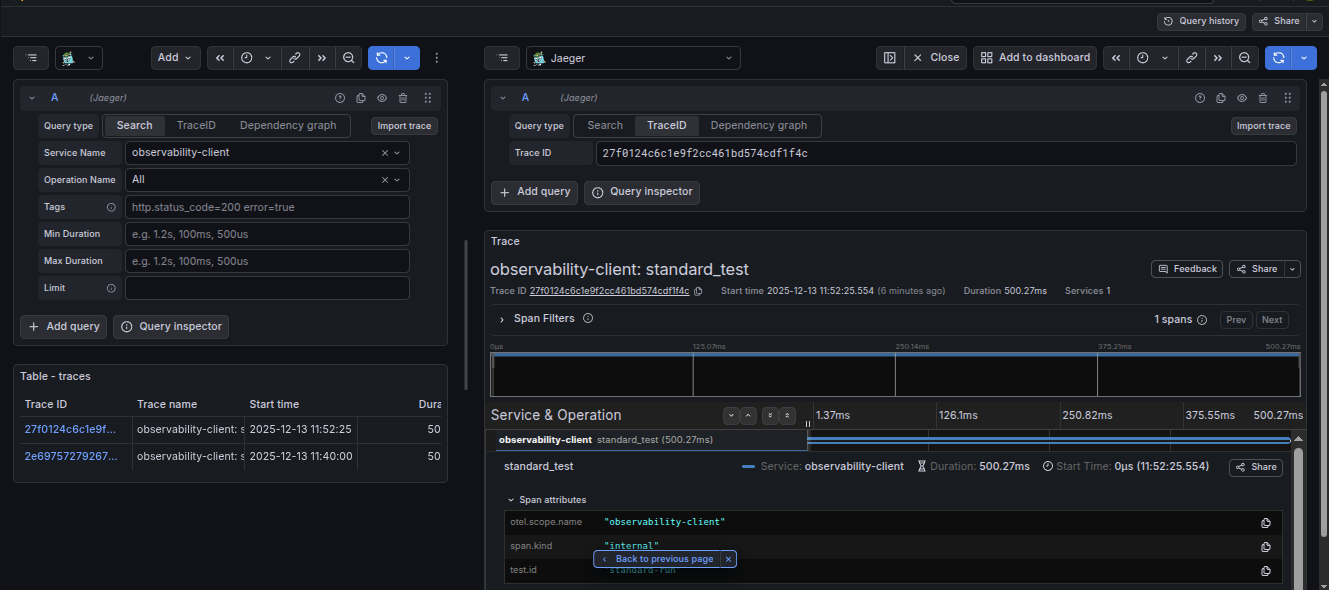 Distributed traces flowing from your app through to Grafana Tempo
Notes
- HTTP-level patching (
httpx,requests) catches any LLM provider not explicitly supported. - To add a custom patcher, implement the
PatcherPortprotocol insrc/features/auto_instrumentation/ports.py.